Showing posts with label Web Application. Show all posts

Tuesday, 7 August 2012

Understanding Web Servers: Part 2


For the basic function of web servers, refer to Understanding Web Servers: Part 1

Consider the URL, http://clareciriaco.appspot.com/portfolio/about.html

Pink: Tells the server the communication protocol to be used. In this case, HTTP.
Red: The Server, which is mapped to an IP address.
Green: The resource path on the server where the resource can be found.
Blue: The resource requested by the client(Either a human being or a browser like Mozilla, IE).

Most resources being requested are HTML pages. The pages are then classified as Static and Dynamic.


A Static Page


A Dynamic Page


If you would notice, the static page's time will not change. It will always be 12:30 PM. However, if you look at the dynamic page, it will get the current server time. BUT! HTML alone does not have capabilities on getting the server time. Remember!  HTML deals only with "How to display the data". What we need, is a WEB SERVER APPLICATION.


A Web Server Application does not change/alter/do anything with the resource. Instead, it FINDS another application on the server to help with getting the server time.

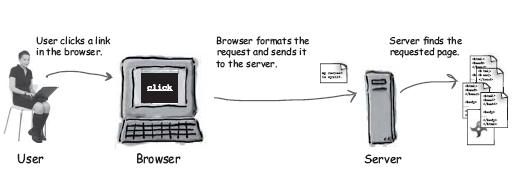
Image Source: Headfirst JSP + Servlets

Understanding Web Servers: Part 1

Most of us are confused with what web server really does. Sometimes, we also get confused with what languages we should use. This post will help you understand more about servers.

The main purpose of a web server is: A Web Server takes a request from a client and gives a response.

A client can be a human being or a browser such as Mozilla, IE, Chrome Etc. Before we start, here is a diagram showing the main purpose of a web server.

REQUEST

Request: A request could be an image, PDF File file or even an html page.


A request can have several methods. But the most commonly used are GET and POST.
GET: The simplest HTTP method which job is to ask the server to get a resource and send it back.

POST: More powerful than GET. You can request resources, and at the same time send data to the server. It's like GET + data sending capabilities.


RESPONSE
Response: Contains the actual document requested by the client. (Or error codes if the request cannot be processed.)


Image sources: Headfirst JSP and Servlets Book

Part 2: http://sandsations.blogspot.hk/2012/08/understanding-web-servers-part-2.html