Friday, 19 April 2013

Parsing XML with JQuery

To parse an XML file with JQuery, you can follow these simple steps.

1. Obtain the xml using JQuery Ajax. There are two possible location where the xml file can be located. You have to make sure of your file path.
2. Parse the Ajax Response (your XML file) and append the data to your html code.

Suppose you have a XML file: (download here)

<student_list>
   <students>
     <student_id>2013001</student_id>
       <name>Clare Marie Ciriaco</name>
    </students>
    <students>
      <student_id>2013002</student_id>
        <name>Jane Doe</name>
   </students>
   <students>
     <student_id>2013003</student_id>
       <name>John Fitzgerald</name>
   </students>
</student_list>

To parse it,


OUTPUT:


Friday, 12 April 2013

java.lang.ClassNotFoundException: com.sun.el.ExpressionFactoryImpl

When running JSF with Tomcat 7.0, I stumbled upon this error. Turns out, you  have to put the following JARS in Tomcat's library folder before running your project.

My Path: C:\Program Files\apache-tomcat-7.0.23\apache-tomcat-7.0.23\lib
Note: This may vary from different users
  • el-api-2.2.jar
  • el-impl-2.2.jar

Wednesday, 20 March 2013

Understanding Object-Relational Mapping

Object-Relational Mapping, or in short ORM is used to map data taken from a database to Objects.

For instance, you have a table PERSON in your database with the following values:


In your code, you need to get the Person object with id=2. So the expected output should be

{ 2, Jane, Fitzgerald, jfitzgerald@gmail.com }


So you create a query,

Select * from Person where id='2'. This is where hibernate, iBatis or other ORM.


The blue line is the job for iBatis, Hibernate and other ORM. Every ORM has a different way of mapping the data from the database to an object.


Thursday, 10 January 2013

Java: String Concatention Precedence

With the ability of Java to concatenate strings using the plus (+) sign, a common mistake that new programmers may face is the mix up of adding integers and strings. Let me show you a sample.

Consider the following code:

public class StringConcatTest { 
   public static void main(String[] args){
       int firstNum = 10;
       int secNum = 5;    
       System.out.println(firstNum + secNum + " total number of apples.");
       System.out.println("Total number of apples: " + firstNum + secNum);       
   }
} 

OUTPUT:
15 total number of apples.
Total number of apples: 105 


Clearly, the second sentence is incorrect.

Tuesday, 1 January 2013

Java: Valid Java Keywords

A table of java keywords that cannot be used as identifiers.


Java: Handling Braces

It is good programming practice to maintain a format when coding. These formats can be anything from indentation, white spaces, line wrapping, separation of code and braces handling. Why is it important? - To make the code readable.

There are two distinct way of handling braces:

1. K&R style

while(a!=b){
     doMethod();
}

2. Allman Style

while(a!=b)
{
     doMethod();
}

Personally I prefer the K&R and I practice it on my code. Always remember, good coding practice makes a good programmer. :)

Thursday, 18 October 2012

Java : Date Formats

Common Questions with Date Format

1. What are the possbile date formats?
2. Can I use any delimiter?

I couldn't find a concrete explanation of the possible date formats but I decided to write one based on trial and and error.

Date dateNow = new Date();

a.
System.out.println(dateNow);
Output: Fri Oct 19 09:26:59 CST 2012

b.
String dateStr = new SimpleDateFormat("MMM/dd/yyyy").format(dateNow);
System.out.println(dateStr);
Output: Oct/19/2012

Use MMM to get Jan, Feb, Mar, Apr, May, Jun, Jul, Aug, Sep, Oct, Nov, Dec

Note: If the output month is not in the format "Oct", you can try adding Locale.ENGLISH:
String df = new SimpleDateFormat("MMM/dd/yyyy", Locale.ENGLISH).format(dateNow);

c.
String dateStr = new SimpleDateFormat("yyyy-MM-dd").format(dateNow);
System.out.println(dateStr);
Output: 2012-10-19 

d.
String dateStr  = new SimpleDateFormat("yyyy/mm/dd").format(dateNow);
System.out.println(dateStr);
Output: 2012/38/19

Note : In letter D, the output is supposedly 2012/10/19. However, you are using the format "yyyy/mm/dd". The month variable should be in capitals, MM instead of mm.
Note : Also make sure that your year variable are in small letters, yyyy instead of YYYY. It will return an error.

As you can see, the format can be interchangeable.

2. Can I use any delimiter? Yes.

Thursday, 11 October 2012

Javascript Tricks: Getting the full filepath in Mozilla FF and IE.

During our project, I stumbled upon a problem that seemed unsolveable. I was required to get the full path name:

C:\Documents and Settings\Clare\My Documents\test.jpg

My html code was:

<input id="uploadedFile" name="uploadedFile" type="file" onchange="readFile();">
<input type="hidden" value="" id="uploadFileName"/>

My Javascript/Jquery code:

function readFile() {
    var fullPath = $('#uploadedFile').val();   
    if (fullPath != null) {           
        alert(fullPath );
        $('#uploadFileName').val(fullPath ); //Transfer the file path to hidden field
    }

However, this only works with IE. And we mainly use Firefox. 

In firefox,
The output is: test.jpg
 Note: For security reasons, FF prevents the server to access local information.

In IE, 
The output is: C:\Documents and Settings\Clare\My Documents\test.jpg
which is correct.

I have been searching for the solution for almost 8 hours. I have tried using an applet but it didn't work(Probably done it the wrong way). Until I found this 100% working solution:

I forgot the website, but if you are the owner of this code, pls don't hesitate to send me a msg.

Complete html code: 
<input id="uploadedFile" name="uploadedFile" type="file" onchange="readFile(this);">
<input type="hidden" value="" id="uploadFileName"/>

Code:


Tuesday, 7 August 2012

Spring MVC Part 1: Hello World

What you'll need:
Eclipse (I use Helios 3.6.7)

Maven Dependencies (So that you dont need to download the libraries and let Maven do the job for you)

JBOSS Application server (I'm currently using version 4.2.2)


Mentioned above are just the versions that I use. You can download the latest one, or choose your own server. The focus of this tutorial is Spring MVC.

Note: Make sure that you start your server before running the project. You can do this by opening File > New > Other > Server and select the server you want, in our case choose JBOSS. As a noob myself, sometimes I forget this.

What you'll  be doing:
[ ]Controller
[ ]Model
[ ]JSP Page, usually with JSTL 
[ ]Run program

First of all, let me discuss what spring MVC means. MVC stands for MODEL VIEW CONTROLLER.

MODEL = Domain Objects
VIEW = JSP page with CSS and HTML
CONTROLLER =  Controls which JSP page and MODELS should be displayed

Let's start.

File > New > Project > Other > Spring SourceTool Suite > Spring Template Project > Spring MVC Project
Project name: contactlist
Top - level - package: com.contactlist.controller

You can see all the files created for you by Eclipse and Maven. And at the bottom of the project, you can see a POM.xml. 

                            
Explanation

POM.xml : The pom.xml is generated by Maven. It contains the LIBRARIES needed for you to run the project. The difference between using maven is that YOU DO NOT NEED TO add the libraries manually because MAVEN will do it for you. We would study them one by one in future blog posts. But for now, you can have a look at it first.

/WEB-INF/SPRING: appServlet will be used to process your request. 

/WEB-INF/VIEWS: The views folder  will contain the JSP pages for your web app. For those who are not familiar with the JSP page, it is similar to HTML but with you can add java functionality.

src/main/java : This folder will contain the controller and other codes for your application. 


Step 1. Create a simple contact list that would contain the following fields: Name, Address and Tel. Number. 

Go to src/main/java > New > Package

Name:  com.contactlist.domain

This package will contain all the "MODEL" or the data. Each class will have setter and getter methods. So let's create ours!

Step 2. Create a class named "Contact" under the package "com.contactlist.domain".


The domain above is actually called the MODEL.

Step 3. Create a class named "ContactListContoller" under the package com.contactlist.controller. Now, this is where SPRING MVC will come in. 


@Controller : You need this to indicate that THIS CLASS is a controller that CONTROLS the REQUEST being sent by the user.

@RequestMapping : This means that if you call this mapping, http://localhost:8080/contactlist/display, the method listAll will be called.  
Note: Notice that, you are actually returning a STRING, which will be the filename of the JSP Page that you would create to show the contact list.

model.addAttribute("contactList", contactList) : This line actually PUTS the data to the model that would be RETRIEVED later in the JSP page. We will see this in a while.

Step 4. Create the JSP Page and name it "contactPage". All JSP pages should be saved in the /WEB-INF/views folder. So right click on views and choose JSP Page. If you can't find it, go to others and look for JSP page.    

Explanation

<%@ taglib prefix="c" uri="http://java.sun.com/jsp/jstl/core"%>  - Do not forget to put this on your JSP to be able to show the output. So basically, you can access any data you put on the model by using JSTL tags. In our case, since we used model.addAttribute("contact", contact); in our controller, we accessed it by 
<c:out value="${contact.name}"></c:out> where name is a FIELD in the ContactList Domain. Learn more about JSTL tags here: http://www.tutorialspoint.com/jsp/jstl_core_param_tag.htm

So, let's see:
Controller [check]
Model [check]
JSP Page [Check]
and you're done! So now, let's run the program.

The complete directory hierarchy: 
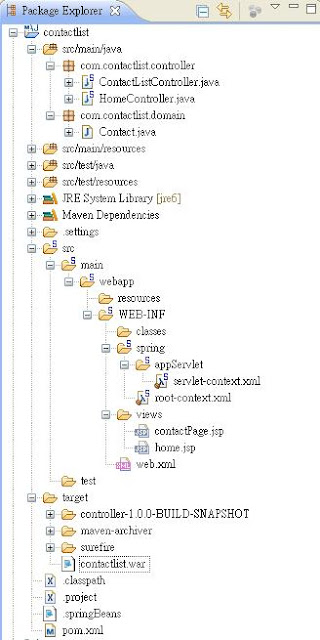


 Step 5. Right click on the project, select Run As > Run on Server > Finish


Voila!
http://localhost:8080/contactlist/display and look what we have here. 

Questions that you may have in mind and couldn't find them on the internet? Ask me and I hope I have the answer. 

OUTPUT 


What is happening? 


1. A request is being sent to the servlet as http://localhost:8080/contactlist/display. As you can see from the servet-context.xml file under src/main/WEB-INF/Spring/appServlet, you will find <annotation-driven/>, which means that Spring will look for annotations to find your controller. What are annotations? Annotations are @Controller, @Requestmapping and the like. Earlier versions of spring actually used XML instead of annotations until they introduced it at Spring 2.5. So now, Spring will find a controller with mapping
"/display" for you. 

2. Spring finds controller with mapping "/display" and boom! Found it! Then performs the method to which it is mapped, in our case, listAll method. So it adds the model, because we have the line model.addAttribute("contact", contact);

3. return "contactPage". This string then goes back to the servet-context. Now, if you would look at the file, you will see a prefix and suffix. So therefore, 
Prefix = "/WEB-INF/views/" 
Suffix = ".jsp" 
Wait, we have our jsp page on the /WEB-INF/views/ path right? so it means, we are in the VIEW part of the MVC and it actually creates the path for us. So, the servlet will now create the path /WEB-INF/views/contactPage.jsp for your app and voila! There's your list of contacts. 

What's next? Noob forms and validation, Android Dev't, IOS Dev't, some struts and grails maybe. Who knows? Anway, if you  have questions, just send  me a message and I will TRY to answer it. Like what I've said: for the noobs by the NOOB. I'm also a beginner at this. 

Have a happy weekend! xoxo. 

DOWNLOAD THE WHOLE PROJECT: contactlist.zip


"Sharing knowledge is not about giving people something, or getting something from them. That is only valid for information sharing. Sharing knowledge occurs when people are genuinely interested in helping one another develop new capacities for action; it is about creating learning processes.
 share this Knowledge Sharing saying   Peter Senge

Eclipse: Java was started but returned exit code = 1

If you are recently faced with this error, it may or may not have something to do with your JDK or JRE.


Solution: Do a clean install of Eclipse, JDK and JRE again. I think is the best solution instead of configuring something from the .ini file.